Samsung TV Menu Style and Sound Feedback guide
Last Update date : Jul 29. 2026
इस लेख को हिंदी में पढ़ने के लिए, यहाँ क्लिक करें
Your Samsung TV’s menu and notification volume can be customized to suit your preferences. For instance, you can adjust the transparency of displayed items and the volume of notification sounds when navigating menus or selecting options.
Change the Menu Style
Your Samsung Smart TV’s menu style can be customized.
1
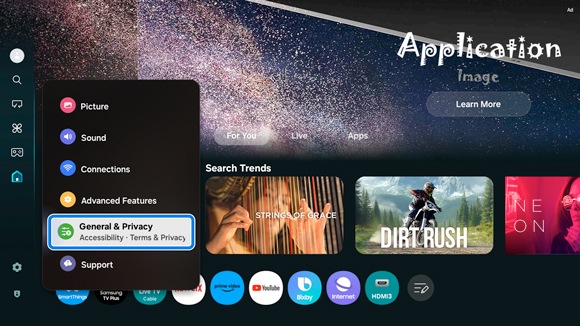
Navigate to and select Settings, then select All Settings, and then select General & Privacy.
![Samsung Smart TV's interface displaying the 'Settings' menu, with 'General & Privacy' highlighted.]()
2
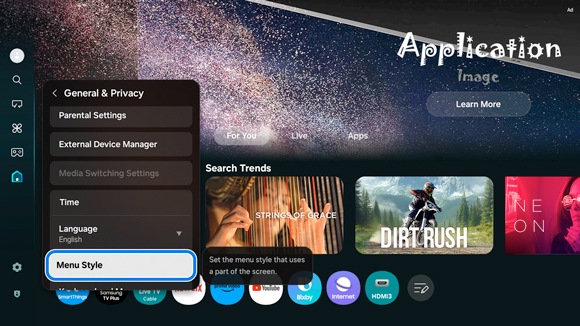
Select Menu Style.
![Samsung Smart TV settings menu, with 'Menu Style' highlighted under the 'General & Privacy' submenu.]()
3
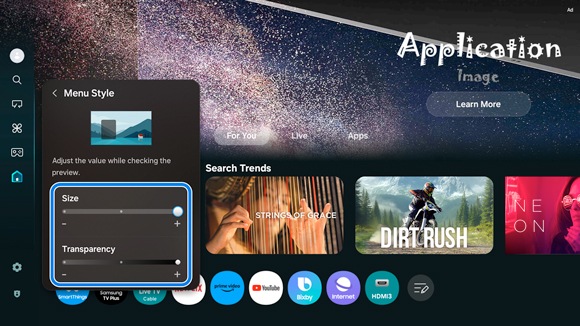
From here, you can change the size and transparency of the menu items displayed on the screen.
![Adjustment options for the Menu Style on a Samsung Smart TV, showing sliders for 'Size' and 'Transparency'.]()
Adjust the Sound Feedback volume
You can also change the volume of notification sounds when selecting menu items and other options.
1
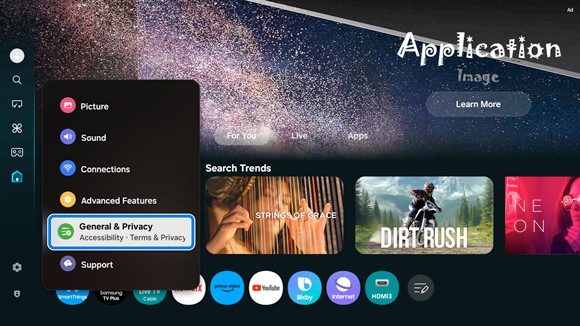
Navigate to and select Settings, then select All Settings, and then select General & Privacy.
![Samsung Smart TV's interface displaying the 'Settings' menu, with 'General & Privacy' highlighted.]()
2
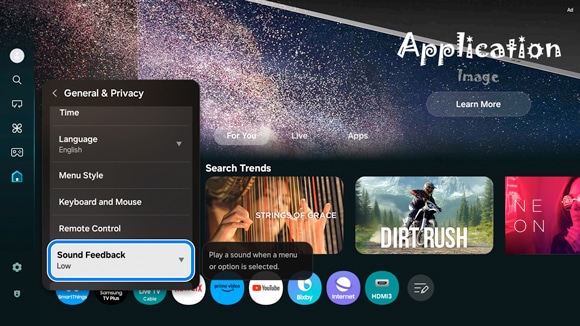
Select Sound Feedback.
![Samsung Smart TV settings menu, with 'Sound Feedback' highlighted under the 'General & Privacy' submenu.]()
3
From here, you can adjust the volume of notification sounds when using menu items or selecting options.
Configure the Settings Menu Guide
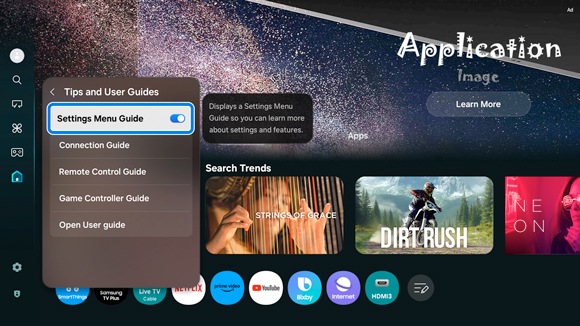
When the Settings Menu Guide is enabled, menu descriptions will appear on the right side of the screen. Disabling this option will hide the descriptions.
1
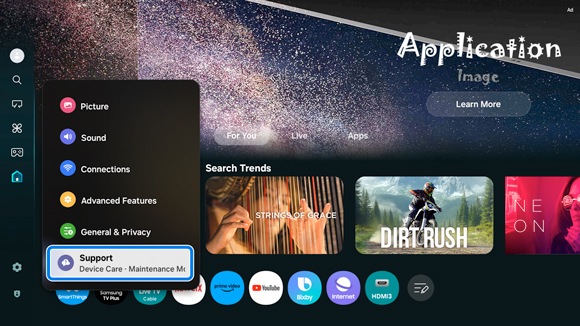
Navigate to and select Settings, then select All Settings, and then select Support.
![Samsung Smart TV's interface displaying the 'Settings' menu, with 'Support' highlighted.]()
2
Select Tips and User Guides, and then select Settings Menu Guide to enable it.
![Options under 'Tips and User Guides' on a Samsung Smart TV, with 'Settings Menu Guide' selected for enabling on-screen descriptions.]()
Notes:
- If you are having trouble with your Samsung Smart TV, you can check for available software updates, as these may contain a solution to your problem.
- Device screenshots and menus may vary depending on the device model and software version.
- All third-party logos/marks are trademarks/registered of respective third-party brands.
- Images are simulated.
Thank you for your feedback!
Please answer all questions.
Contact Info
Digital Service Center
![DSC icon image]()
![DSC icon image]()


Get customized support, access to DIY videos and FAQs, or schedule a callback request to connect with an expert.

Scan to access
Scan to access
WhatsApp
![WhatsApp image icon]()
![WhatsApp image icon]()


WhatsApp us for services-related interaction.
Languages offered : English/ हिन्दी/ Indian Regional Languages
Available 24 Hours / 7 days
WhatsApp@ 1-800-5-726-7864

Scan to access
Languages offered : English/ हिन्दी/ Indian Regional Languages
Available 24 Hours / 7 days
WhatsApp@ 1-800-5-726-7864
Scan to access


Remote Service
![Image of RM icon]()
![Image of RM icon]()


Remote diagnostics by our specially trained technicians for your Galaxy device and Samsung TV
CEO Office
![Image of CEO icon]()
![Image of CEO icon]()


Share feedback to CEO office & relevant team will get in touch with you promptly.
Phone Support (India)
![image of phone dialer]()
![image of phone dialer]()


Available: 9 AM to 7 PM (All 7 days)
Phone Support (Bangladesh, Sri Lanka, Nepal)
![Image of caller icon]()
![Image of caller icon]()
RC01_Static Content : This text is only displayed on the editor page